All Categories · GPT Image 2 模板风 · All Ratios
Sort by: Most Relevant
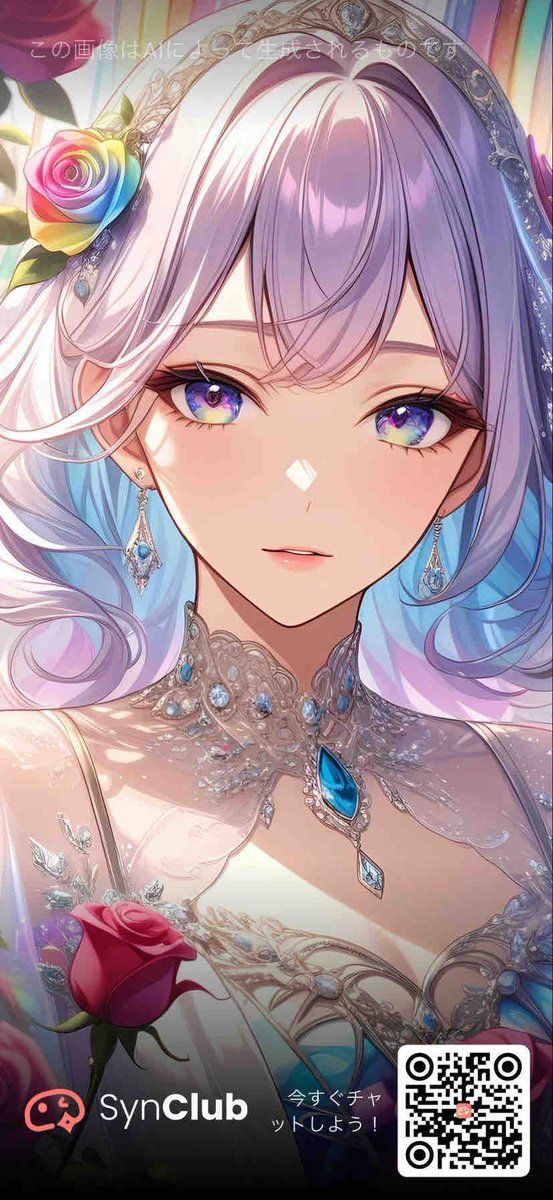
Product Marketing - Rose Jewel Anime App Poster

Product Marketing - Rose Jewel Anime App Poster

Generates a vertical fantasy anime promotional poster with a rose-themed jeweled heroine, privacy mask, app branding, CTA, and QR code.

Template

Goal: Create a vertical mobile promotional anime poster for {argument name="app name" default="SynClub"}, themed around {argument name="flower motif" default="roses"} and luxurious gemstones. Canvas: Tall smartphone aspect ratio, 9:16, full-bleed illustration with a darkened promotional footer overlay at the bottom. Main subject: A close-up fantasy anime portrait of an elegant young woman from the chest up, centered and facing forward. Her face is mostly covered by a large centered square privacy mask, a soft pastel gradient block shifting from dusty pink on the left to lavender-blue on the right. Visible details include long flowing pastel hair in white, pink, lavender, and pale blue, glossy strands curling around her shoulders, fair skin, and a small visible mouth below the mask. Costume and accessories: She wears an ornate silver-white jeweled headpiece like a tiara or halo arch with filigree details and blue gemstones. Add exactly 1 rainbow rose tucked near the left side of her hair, with red, yellow, green, blue, and violet petals. Her neckline is covered with elaborate crystal lace jewelry, silver filigree, pearls, and blue teardrop gemstones, including exactly 1 large bright blue teardrop pendant at the center of her chest and exactly 1 smaller diamond-shaped blue pendant hanging beneath it. Her dress is pale, delicate, and bridal, with translucent lace, sparkling highlights, and gem-like embroidery. Foreground and background: Use a soft dreamy pastel fantasy background with vertical stained-glass-like light streaks in pink, yellow, cyan, and violet. Add exactly 1 red rose in the lower-left foreground, partly overlapping the dress. Keep the illustration highly polished, luminous, romantic, and detailed, with an ethereal manga style and glossy digital painting finish. Text and promotional overlay: Add faint white Japanese text near the top reading {argument name="top notice text" default="この画像はAIにより生成されるものです"}. At the bottom, place a dark black-to-transparent gradient footer containing exactly 4 promotional elements: 1 red chat-face icon on the far left, 1 white brand wordmark reading {argument name="brand wordmark" default="SynClub"} with “Club” in bold, 1 small Japanese call-to-action reading {argument name="call to action" default="今すぐチャットしよう!"}, and 1 black-and-white QR code in a rounded white square at the bottom right. Constraints: Preserve the face-obscuring square mask, keep all text legible, use no extra characters, include exactly 2 roses total, and maintain a polished vertical social-media advertisement composition.
Product Marketingawesome-gpt-image-2GPT Image 2Product MarketingUse template
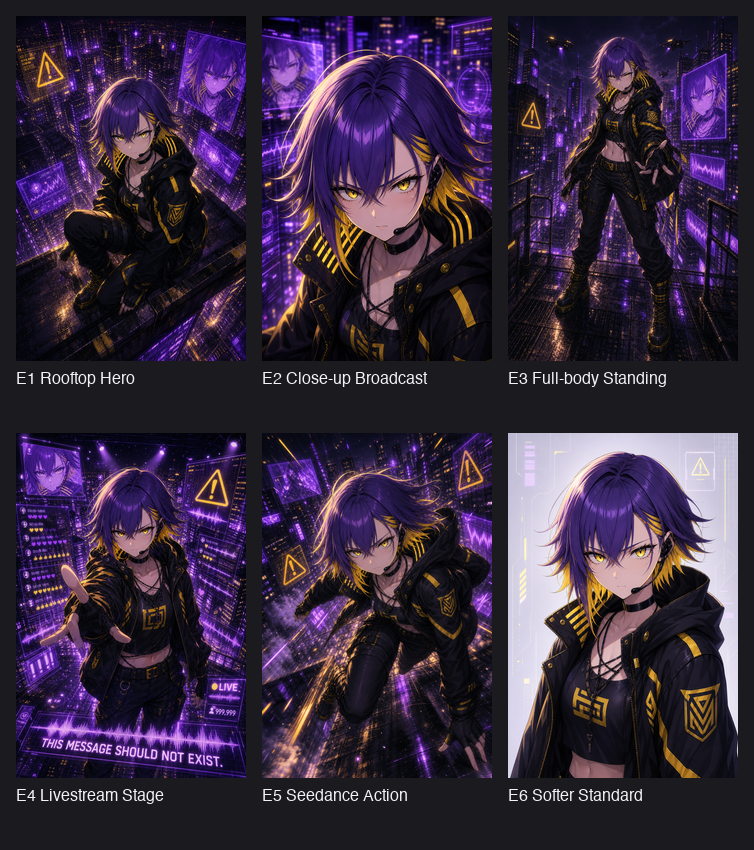
Comic / Storyboard - Cyberpunk Anime Hero Contact Sheet

Comic / Storyboard - Cyberpunk Anime Hero Contact Sheet

Creates a six-panel gallery of consistent cyberpunk anime character variations with captions for comparing compositions.

Template

Goal: Create a dark presentation contact sheet showing six anime cyberpunk character illustration variations generated from the same design, arranged as a 3-column by 2-row gallery on a charcoal background. Canvas: Square image, approximately 768×850 px, dark gray page background with generous margins. Each artwork tile is vertical portrait format, evenly spaced, with a white caption beneath it. Use a clean sans-serif font, small to medium size, left-aligned under each tile. Main character: A rebellious anime-style cyberpunk hero named {argument name="character name" default="E1"}, androgynous young adult with shaggy layered {argument name="hair color" default="deep violet hair with golden-yellow underside streaks"}, sharp golden eyes where visible, pale skin, slim athletic build, and a confident dangerous expression. Outfit is a black hooded techwear jacket with yellow hazard-stripe accents, gold trim, triangular insignia patches, black cropped top with yellow emblem, strappy neckline, black cargo pants, belts, gloves, and heavy black boots with yellow laces. Overall palette is black, neon purple, electric violet, and warning-sign yellow. Gallery layout: Include exactly 6 portrait illustration tiles, each with a distinct composition and caption: 1. Top-left tile caption: “E1 Rooftop Hero”. High-angle rooftop crouching pose above a dense neon city, purple holographic panels floating around, yellow warning triangle icon, dramatic rain-slick ledge and glowing skyscrapers. Add a soft square blur over the face. 2. Top-middle tile caption: “E2 Close-up Broadcast”. Tight close-up portrait from the chest up, hair blowing, purple broadcast interface graphics and city lights behind the character, intense neon rim light. Add a soft square blur over the face. 3. Top-right tile caption: “E3 Full-body Standing”. Full-body character standing on a wet rooftop walkway or fire escape, one hand reaching forward, skyscrapers and purple screens behind, yellow warning signs, glossy reflections on the floor. 4. Bottom-left tile caption: “E4 Livestream Stage”. Front-facing upper-body pose with one hand extended toward the viewer, surrounded by futuristic livestream UI panels, purple hologram screens, small hearts and counters, a bottom banner reading “THIS MESSAGE SHOULD NOT EXIST.” and a small “LIVE” badge. 5. Bottom-middle tile caption: “E5 Seedance Action”. Dynamic action pose, character lunging or sprinting diagonally across a rain-soaked cyberpunk rooftop, motion blur, neon purple city perspective, yellow warning icons, energetic cinematic angle. 6. Bottom-right tile caption: “E6 Softer Standard”. Cleaner softer portrait on a pale lavender tech-interface background, bust-up framing, same jacket and outfit, calmer lighting, minimal neon UI elements. Add a soft square blur over the face. Visual style: Highly polished anime illustration, cyberpunk noir atmosphere, dramatic rim lighting, glossy wet surfaces, dense futuristic city detail, purple holograms, yellow hazard iconography, sharp linework, rich contrast, cinematic composition. The six tiles should look like consistent variations of the same character and world. Constraints: Use exactly six tiles and exactly the six captions listed above. Preserve the contact-sheet layout and dark background. Keep the labels readable in English. Do not add extra panels, watermarks, logos, or unrelated characters. Use the background city theme {argument name="setting" default="rainy neon cyberpunk metropolis"} and overall mood {argument name="mood" default="dangerous heroic hacker-broadcast energy"}.

Comic / Storyboardawesome-gpt-image-2GPT Image 2Comic / StoryboardUse template
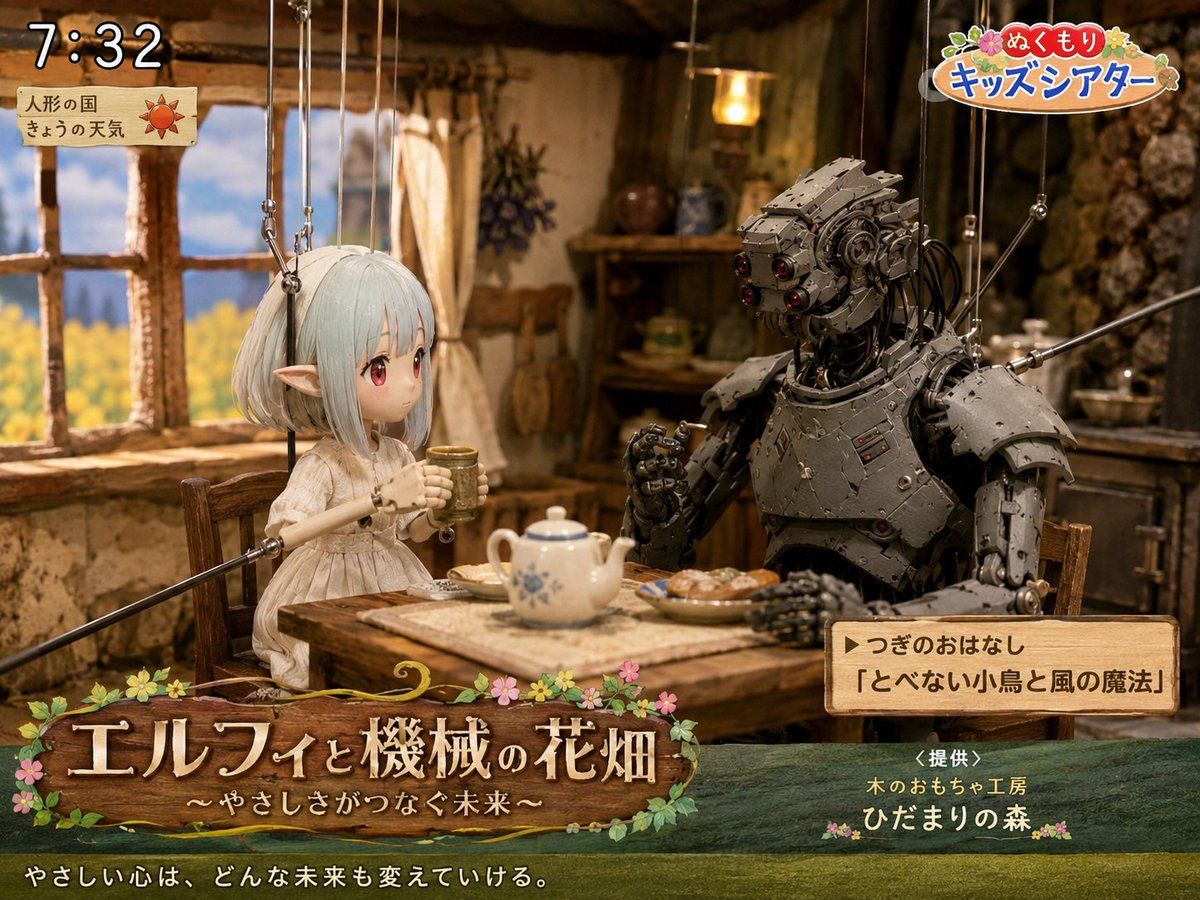
Comic / Storyboard - Elf and Robot Puppet Theater Still

Comic / Storyboard - Elf and Robot Puppet Theater Still

A detailed prompt for generating a nostalgic Japanese children's TV puppet-theater still with an elf, a robot, cozy cottage set, and broadcast overlays.

Template

Goal: Create a cozy Japanese children's TV theater still showing a puppet-style fantasy scene titled {argument name="show title" default="エルフィと機械の花畑"}, with a gentle storybook atmosphere and visible broadcast graphics. Canvas: 4:3 landscape frame, warm cinematic lighting, shallow depth of field, detailed handcrafted miniature set. Main scene: Inside a rustic cottage kitchen with clay-plaster walls, exposed wood beams, a wooden window on the left looking out to a bright yellow flower field and blue sky, shelves and hanging herbs in the background, and a small wooden table in the foreground. Two marionette characters sit at the table drinking tea: 1) a delicate elf girl puppet on the left with pale mint-white bobbed hair, long pointed ears, a simple cream linen dress, slim wooden puppet arms, and visible suspension strings attached above; her face area is softly blurred/obscured as if anonymized, 2) a large humanoid robot puppet on the right made of dark riveted metal plates, exposed cables, red lens eyes, bulky shoulder armor, articulated hands, and visible marionette rods/strings. The elf holds a small cup with both hands; the robot raises one hand as if speaking. On the table include exactly 4 visible food and tea items: a white teapot with blue floral pattern, one small cup in the elf's hands, one plate of pastries, and a rectangular cloth or tray under the teapot. Broadcast overlay layout: Add exactly 5 graphic/text areas: 1) top-left digital clock reading {argument name="broadcast time" default="7:32"} in large white outlined numerals, 2) below it a small parchment weather card with Japanese text 「人形の国」 and 「きょうの天気」 plus a red sun icon, 3) top-right colorful logo reading {argument name="program logo" default="ぬくもり キッズシアター"} with flowers and rounded playful lettering, 4) bottom-left large wooden signboard title with flowers and vines reading 「エルフィと機械の花畑」 and subtitle 「〜やさしさがつなぐ未来〜」, 5) lower-right wooden next-story box reading 「▶つぎのおはなし」 and 「『とべない小鳥と風の魔法』」. Additional bottom text: Across the very bottom, add the white Japanese tagline {argument name="tagline" default="やさしい心は、どんな未来も変えていける。"}. Near the lower-right above the bottom edge, add sponsor text 「<提供>」, 「木のおもちゃ工房」, and 「ひだまりの森」 with small flower decorations. Visual style: Hyper-detailed stop-motion puppetry mixed with fantasy miniature photography, warm amber interior light, nostalgic NHK-style children's morning program, polished gpt-image-2 realism, tactile wood, cloth, metal, and paper textures. Keep all marionette strings visible and delicate. Use soft bloom around the window and cozy shadows in the cottage. Constraints: Use exactly 2 seated characters, exactly 5 broadcast graphic/text areas, and exactly 4 table items as listed. Keep the scene wholesome and gentle, no extra logos beyond the described fake TV graphics, no modern appliances, no watermark.

Comic / Storyboardawesome-gpt-image-2GPT Image 2Comic / StoryboardUse template
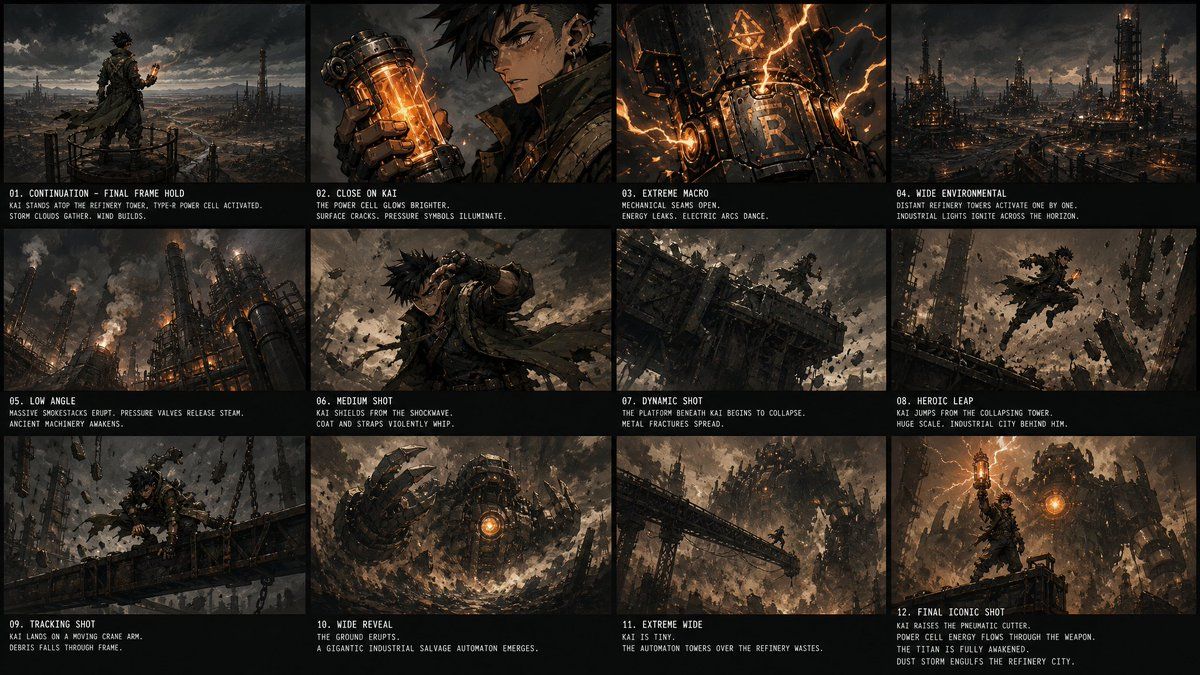
Comic / Storyboard - Kai Industrial Titan Storyboard

Comic / Storyboard - Kai Industrial Titan Storyboard

A 12-panel cinematic steampunk storyboard showing Kai activating a power cell and awakening a gigantic refinery automaton.

Template

Goal: Create a dark cinematic storyboard/contact sheet for an action-fantasy steampunk sequence starring {argument name="character name" default="Kai"}, continuing from a previous final frame with no reset: same stormy refinery environment, same lighting, same character position and wardrobe continuity. Canvas: Wide 16:9 storyboard sheet, approximately 1200×675, black background with thin black gutters. Arrange exactly 12 widescreen panels in a 4-column by 3-row grid. Each panel has a cinematic frame above and a black caption strip below with small condensed white uppercase type, including a numbered shot title and two short description lines. Visual style: Gritty high-detail concept art, dark dieselpunk/steampunk industrial fantasy, ash-filled sky, brown-black metal palette, orange power-cell glow, lightning-like energy arcs, smoke, dust, sparks, ruined refinery towers, massive machinery, collapsing platforms, dramatic low-key lighting, dynamic camera angles, film storyboard presentation. Main character details: Kai is a spiky-haired young male warrior in ragged layered tactical clothing: dark cloak, straps, leather armor, metal gauntlets, utility belts, wind-torn scarf or coat tails, soot and grime on face, intense expression. He carries or activates a glowing cylindrical power cell with orange core energy. Keep him consistent across all panels. Storyboard layout and text content: Include exactly 12 discrete panels with these labels and visible descriptions: 01. CONTINUATION - FINAL FRAME HOLD Kai stands atop the refinery tower, type-R power cell activated. Storm clouds gather. Wind builds. 02. CLOSE ON KAI The power cell glows brighter. Surface cracks. Pressure symbols illuminate. 03. EXTREME MACRO Mechanical seams open. Energy leaks. Electric arcs dance. 04. WIDE ENVIRONMENTAL Distant refinery towers activate one by one. Industrial lights ignite across the horizon. 05. LOW ANGLE Massive smokestacks erupt, pressure valves release steam. Ancient machinery awakens. 06. MEDIUM SHOT Kai shields from the shockwave. Coat and straps violently whip. 07. DYNAMIC SHOT The platform beneath Kai begins to collapse. Metal fractures spread. 08. HEROIC LEAP Kai jumps from the collapsing tower. Huge scale. Industrial city behind him. 09. TRACKING SHOT Kai lands on a moving crane arm. Debris falls through frame. 10. WIDE REVEAL The ground erupts. A gigantic industrial salvage automaton emerges. 11. EXTREME WIDE Kai is tiny. The automaton towers over the refinery wastes. 12. FINAL ICONIC SHOT Kai raises the pneumatic cutter. Power cell energy flows through the weapon. The titan is fully awakened. Dust storm engulfs the refinery city. Shot-specific imagery: Panel 1 shows Kai from behind on a high circular railing overlooking a vast industrial wasteland, holding a small orange glowing cylinder. Panel 2 is a close-up of his gloved hand holding the glowing power cell near his face, with one soft blurred vertical rectangle obscuring part of the face area. Panel 3 is an extreme close-up of a metal machine surface marked with a large R, glowing orange cracks and arcs. Panel 4 shows a wide refinery skyline with many towers lighting up. Panel 5 uses a low angle on smokestacks venting steam and flame. Panel 6 shows Kai bracing against a violent blast with debris flying. Panel 7 shows a collapsing steel platform and tiny Kai amid fractured girders. Panel 8 shows Kai suspended mid-leap surrounded by shattered debris. Panel 9 tracks him crouched on a crane arm with chains and falling rubble. Panel 10 reveals a huge circular mechanical automaton head or torso rising from dust, orange core glowing. Panel 11 is an extreme wide silhouette of Kai on a bridge facing the towering automaton. Panel 12 is the heroic finale with Kai standing foreground, orange power glowing through his raised weapon, giant machine and refinery chaos behind him. Constraints: Use exactly 12 panels, exactly the listed captions, no extra panels, no logos or watermarks. Maintain consistent character, environment, stormy lighting, orange energy motif, and black storyboard caption strips throughout.

Comic / Storyboardawesome-gpt-image-2GPT Image 2Comic / StoryboardUse template
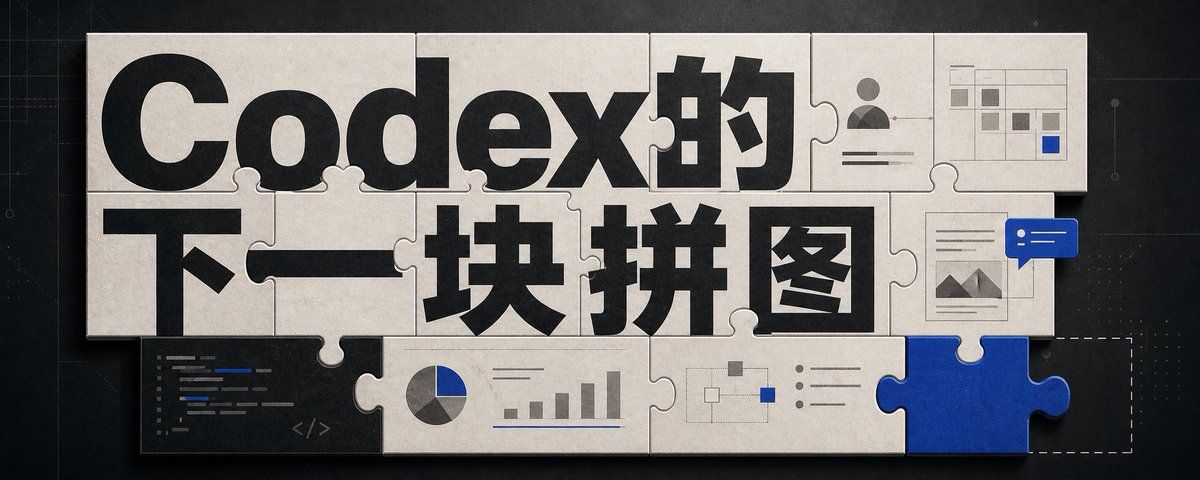
Infographic / Edu Visual - Codex Jigsaw Puzzle Tech Banner

Infographic / Edu Visual - Codex Jigsaw Puzzle Tech Banner

A wide editorial tech banner using interlocking puzzle pieces, bold Chinese headline typography, and small AI workflow UI motifs to illustrate Codex as the next missing piece.

Template

Goal: Create a wide editorial hero banner about {argument name="headline topic" default="Codex的下一块拼图"}, showing a jigsaw-puzzle metaphor for AI coding, visual design, and missing capabilities. Canvas: Ultra-wide horizontal banner, approximately 5:2 aspect ratio, dark charcoal technical background with faint grid lines, subtle blueprint marks, tiny dots, and thin circuit-like guide lines. Center the artwork with a large off-white paper/cardboard jigsaw puzzle assembly casting soft shadows. Layout: Use exactly 15 visible puzzle elements: 13 off-white connected puzzle pieces forming a rectangular mosaic, 1 vivid cobalt-blue puzzle piece inserted at the bottom-right edge, and 1 dashed-outline empty missing-piece slot immediately to the right of the blue piece. The puzzle should look physical, with rounded tabs and sockets, slight bevels, paper texture, seams, grime, and realistic shadowing. Text content: The main typography dominates the puzzle surface. Use huge bold black sans-serif Chinese type reading {argument name="main title text" default="Codex的"} across the top row and {argument name="subtitle text" default="下一块拼图"} across the middle row. Make the letters oversized, cropped slightly by puzzle seams, and integrated into the tile layout. Keep the text crisp and high contrast. Visible graphic elements: Include exactly 7 small embedded UI/diagram motifs on puzzle pieces: 1 dark code editor panel in the lower-left with short colored code lines and a small </> symbol; 1 pie chart combined with a small bar chart along the lower middle; 1 simple node-and-connector flow diagram near the lower center-right; 1 bullet-list panel with three round bullets to the right of the flow diagram; 1 user profile card in the upper-right with avatar icon and horizontal text lines; 1 small spreadsheet/dashboard grid in the top-right corner with gray cells and one blue highlighted cell; 1 document/image card on the right side with small mountain thumbnail lines, overlapped by a blue chat bubble containing two white dots and two white horizontal lines. Visual style: Premium tech editorial illustration, cinematic lighting, tactile paper puzzle texture, muted monochrome palette of black, warm off-white, gray, and accent cobalt blue {argument name="accent color" default="cobalt blue"}. Add subtle scratches, dust, and paper grain. Use realistic shadows between pieces, but keep the whole image clean and readable. Constraints: No people, no extra logos, no watermark, no random English words beyond tiny unreadable code strokes, and no additional large text. The blue puzzle piece should feel like the key missing component that completes the system, while the dashed empty slot hints that another piece is still absent.

Infographic / Edu Visualawesome-gpt-image-2GPT Image 2Infographic / Edu VisualUse template
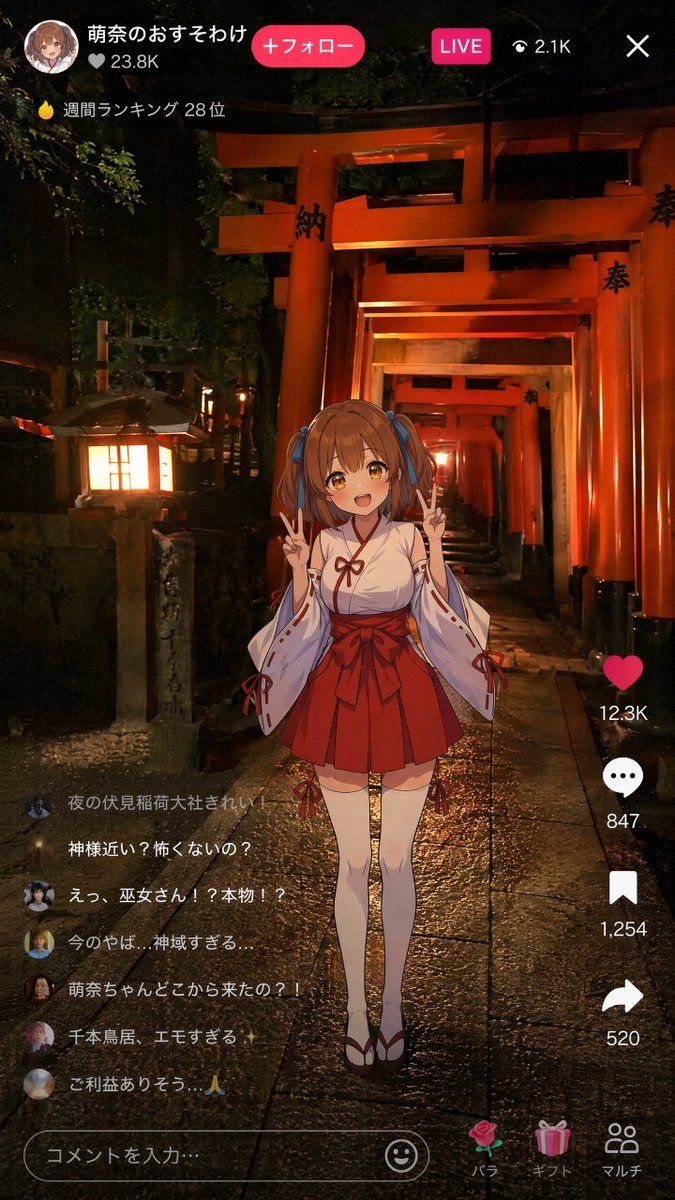
Social Media Post - Anime Miko Night Shrine Livestream

Social Media Post - Anime Miko Night Shrine Livestream

Generates a TikTok-style Japanese livestream screenshot of an anime shrine maiden avatar broadcasting from a realistic night scene at Fushimi Inari Shrine.

Template

Goal: Create a vertical smartphone live-stream screenshot showing a Gen Z anime shrine maiden doing a livestream at night inside Fushimi Inari Shrine, blending a realistic photo-like background with a 2D anime avatar overlay and social media UI. Canvas: 9:16 vertical mobile screen, 675 × 1200 style composition. Dark nighttime atmosphere, high contrast, warm orange shrine lighting, realistic wet stone path reflections. Background: A photorealistic night scene of endless vermilion torii gates receding into the distance at Fushimi Inari Shrine. The path is centered with strong depth perspective. Add a glowing stone lantern on the left foreground, dark trees and foliage around the gates, glossy rain-wet paving stones, and warm amber light spilling across the scene. Some torii pillars have black Japanese characters painted on them. Main subject: Center foreground full-body anime girl avatar, slightly pasted over the realistic scene like an AR live-stream filter. She is {argument name="character name" default="Moena"}, a cute young shrine maiden with {argument name="hair color" default="brown"} twin-tail hair tied with blue ribbons, soft anime shading, and a deliberately blurred/obscured face as if anonymized. She wears a traditional miko outfit: white kimono top with red trim, long detached sleeves with red cords, red pleated hakama-style skirt with a large bow at the waist, white thigh-high tabi socks, and red-and-white sandals. Pose: standing upright, both hands raised near her shoulders making double peace signs. Cute, cheerful idol-streamer energy. Top live-stream UI: Overlay a TikTok-like livestream interface. At top left show a circular anime profile icon, username text in Japanese: {argument name="account name" default="萌奈のおすそわけ"}, a heart count “♡ 23.8K”, and a bright pink rounded button reading “+フォロー”. Near the top center-right show a pink “LIVE” badge, an eye icon with “2.1K”, and a white close X at the far right. Under the username area show a small flame icon and the ranking text “週間ランキング 28位”. Right-side engagement column: Include exactly 4 vertical action items: 1) red heart icon with “12.3K”, 2) white comment bubble with “847”, 3) white bookmark icon with “1,254”, 4) white share arrow with “520”. Comment overlay: Add exactly 6 semi-transparent live comments stacked on the lower left, each with a small circular avatar. Preserve these Japanese comments: 1) “夜の伏見稲荷大社きれい!” 2) “神様近い?怖くないの?” 3) “えっ、巫女さん!?本物!?” 4) “今のやば…神域すぎる….” 5) “萌奈ちゃんどこから来たの?!” 6) “千本鳥居、エモすぎる”. Beneath them add a final faint comment line “ご利益ありそう。🙏”. Bottom input and navigation UI: At bottom left place a rounded comment input field reading “コメントを入力…”, with a smiley icon at its right end. At bottom right add exactly 3 gift/navigation icons with labels: a rose labeled “バラ”, a present labeled “ギフト”, and two-person icon labeled “マルチ”. Visual style: Realistic cinematic shrine photo background plus crisp anime illustration overlay, mobile livestream screenshot, Japanese social app aesthetic, bright pink accent UI, white text, subtle transparency on comments, no extra characters, no watermark, no visible camera frame outside the phone screenshot.

Social Media Postawesome-gpt-image-2GPT Image 2Social Media PostUse template
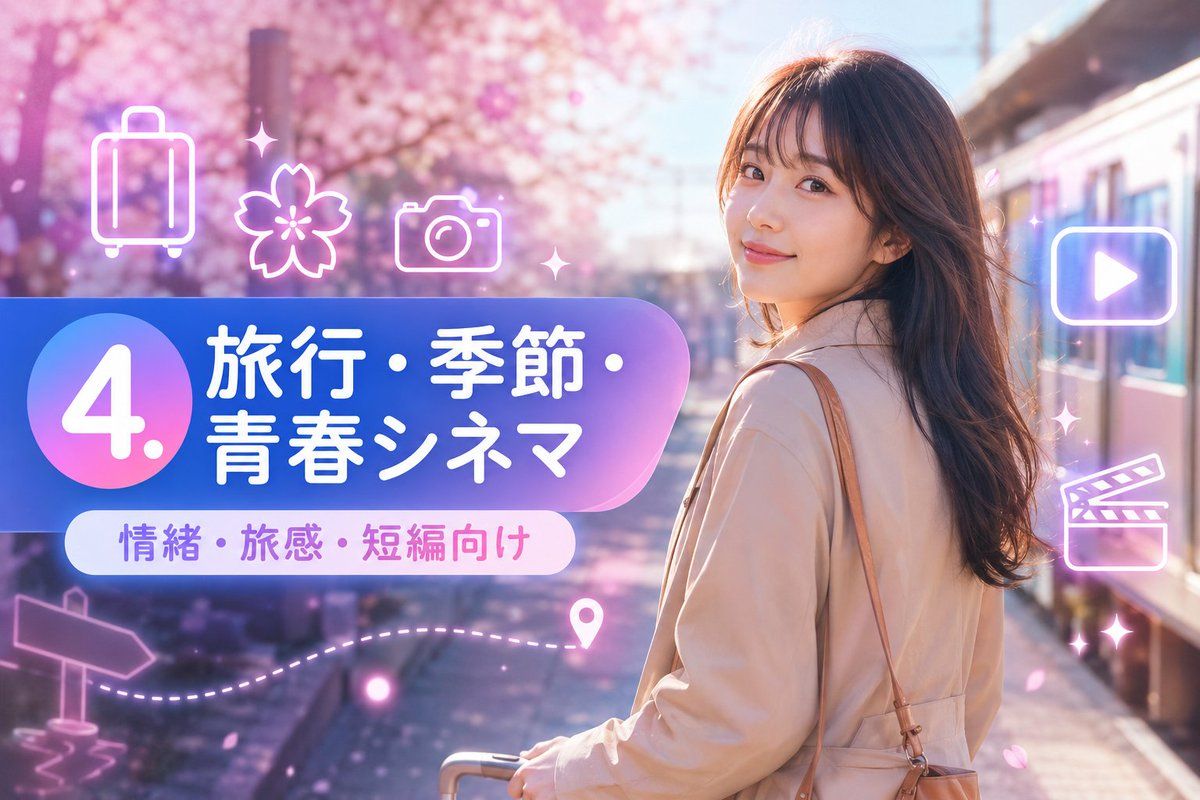
YouTube Thumbnail - Sakura Travel Cinema Title Card

YouTube Thumbnail - Sakura Travel Cinema Title Card

Creates a Japanese spring travel-themed social media thumbnail with sakura scenery, neon icons, and a bold numbered title banner.

Template

Goal: Create a vibrant Japanese travel-video title card for a short-form prompt collection, combining a cinematic spring travel photo background with glossy neon UI graphics. Canvas: Horizontal 16:9 image, 1152×768 feel, high-resolution, bright pastel color grading, soft bloom and lens flare. Background: A young woman traveler stands on the right side at a train platform beside a modern train, viewed from behind/three-quarter back, face intentionally obscured by a plain skin-tone rectangular blur. She has long wavy dark brown hair, wears a light beige trench coat, carries a tan shoulder bag, and holds the handle of a small rolling suitcase near the bottom center. The setting is a dreamy cherry-blossom station in spring, with pink sakura trees filling the left and upper background, scattered falling petals, warm sunlight, and shallow depth of field. Main graphic layout: Place a large rounded gradient banner across the left-center, extending toward the woman. The banner uses a blue-to-purple-to-pink translucent glossy gradient with a large circular badge on the far left. Inside the circle, display a huge white number {argument name="section number" default="4."}. To the right of the circle, set bold rounded Japanese headline text in white: {argument name="headline text" default="旅行・季節・青春シネマ"}. Below it, add a smaller white rounded pill label with purple-pink text: {argument name="subtitle text" default="情緒・旅感・短編向け"}. Visible text count: exactly 3 text elements: 1 large number badge reading "4.", 1 main Japanese headline reading "旅行・季節・青春シネマ", and 1 subtitle pill reading "情緒・旅感・短編向け". Neon icon overlay count: exactly 9 glowing white-pink line icons and decorative elements around the banner and right side: 1 suitcase icon at upper left, 1 cherry blossom icon near upper center-left, 1 camera icon above the banner, 1 play button icon inside a rounded rectangle on the upper right, 1 clapperboard icon on the mid-right, 1 signpost arrow icon at lower left, 1 dotted travel path sweeping along the lower left-to-center, 1 map pin near the end of the dotted path, and 2 small sparkle/star accents near the top center and right side. Keep all icons semi-transparent, neon outlined, and softly glowing. Style: Japanese social-media thumbnail design, cute travel aesthetic, glossy gradient panels, soft pink and lavender atmosphere, cinematic bokeh, dreamy sakura petals, clean rounded typography, bright white text with subtle glow, polished promotional-card composition. Constraints: Keep the woman on the right and the graphic title block on the left, do not add extra text, do not add logos or watermarks, keep the face covered by a simple rectangular blur, and maintain a cheerful spring travel mood.

YouTube Thumbnailawesome-gpt-image-2GPT Image 2YouTube ThumbnailUse template
YouTube Thumbnail - Japanese Neon Marketing Thumbnail

YouTube Thumbnail - Japanese Neon Marketing Thumbnail

A glowing Japanese promotional thumbnail for advertising, product appeal, and sales campaign content.

Template

Create a vibrant Japanese marketing course thumbnail for {argument name="campaign topic" default="CM・広告・商品訴求"}. Use a 16:9 horizontal canvas, 1184×768 style, with a glossy purple-blue neon aesthetic and soft depth-of-field office lighting. Background: a modern cosmetics marketing workspace with a blurred large monitor showing a campaign dashboard; visible English text on the monitor includes “NEW CAMPAIGN” and small chart/product panels. On the right, place a young woman marketer in a lavender blouse, seated at a desk with one hand near her chin holding a pen; her face is intentionally hidden by a large opaque matte brown rectangle. Desk details include exactly 5 main objects: an open laptop on the left, a disposable coffee cup in front, printed marketing sheets with colorful layout thumbnails, cosmetics bottles on the right, and a small sign reading “NEW ARRIVAL 30% OFF LIMITED CAMPAIGN.” Overlay a large rounded gradient banner across the lower-left to center, blue-to-purple with glow and transparency. On the far left of the banner, put a large circular badge with the white text “2.”. Main Japanese headline on the banner: “CM・広告・商品訴求” in bold white rounded sans-serif, with “商品訴求” on the second line. Beneath it, add a white pill-shaped label with blue and pink text: “商品訴求・販促・告知向け”. Add exactly 3 large neon line icons: a cyan megaphone in the upper left, a pink shopping bag below it, and a purple play button inside a rounded rectangle on the upper right. Add exactly 8 small glowing sparkle accents scattered around the composition, plus a small pink upward bar-chart icon near the bottom center. Overall style: Japanese YouTube thumbnail, polished digital advertising design, luminous gradients, cinematic blur, clean readable typography, no watermark, no extra text beyond the specified labels.

YouTube Thumbnailawesome-gpt-image-2GPT Image 2YouTube ThumbnailUse template