All Categories · infographic-edu-visual · All Ratios
Sort by: Most Relevant
Infographic / Edu Visual - Clean Subway Tourism Poster Recreation

Infographic / Edu Visual - Clean Subway Tourism Poster Recreation

Creates a straightened, polished digital version of a photographed Chinese subway tourism poster for reuse as a clean public-service poster design.

Template

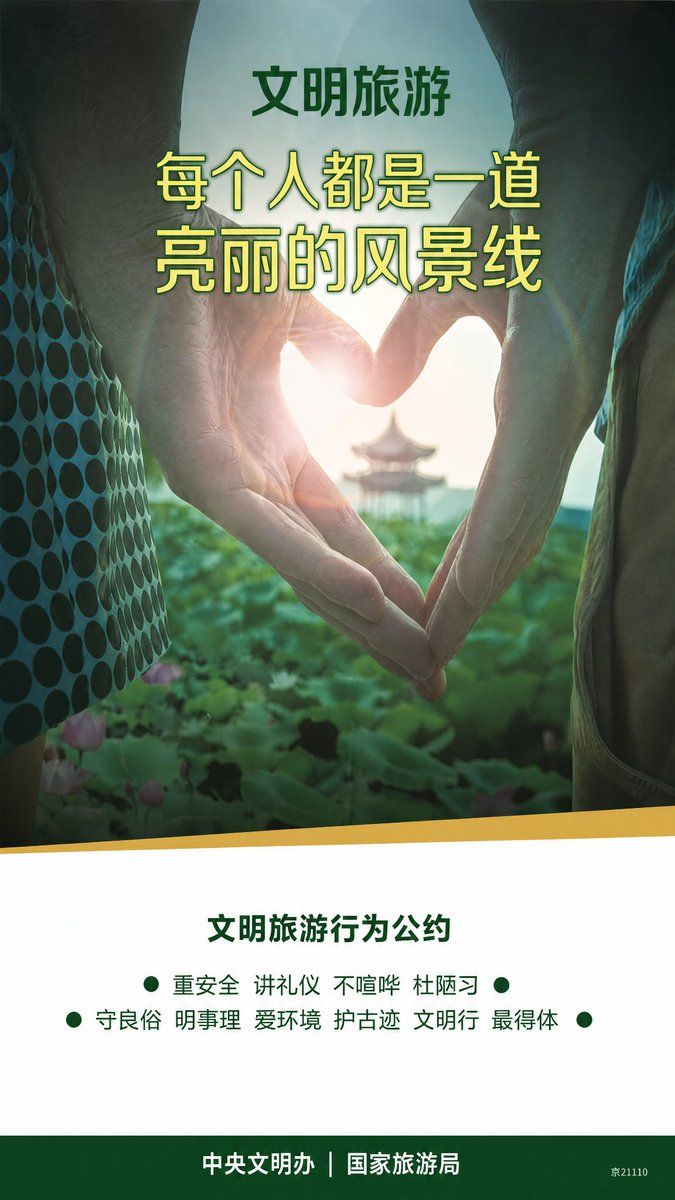
Using REFERENCE_0 as the source, extract and recreate only the transit poster artwork as a clean, front-facing digital poster, removing the subway wall, frame, glass glare, perspective distortion, wrinkles, reflections, and surrounding train interior. Preserve the original poster design and Chinese copy, but make it look like a professionally typeset vertical public-service poster. Canvas: vertical 9:16 poster, full bleed, straight-on view. Image treatment: keep the same central tourism photo concept from the reference: two hands forming a heart shape around the sun, with a soft pavilion and green lotus scenery in the distance. Make the photo cleaner, brighter, more cinematic, and centered, while retaining the same overall crop and mood. Layout: top image section fills most of the poster; lower white information panel with a slightly diagonal yellow divider at the top; dark green footer bar at the bottom. Text to preserve and typeset clearly: - Top small heading: {argument name="top heading" default="文明旅游"} - Main headline in two large yellow-green lines: {argument name="main headline" default="每个人都是一道\n亮丽的风景线"} - Lower section title: {argument name="section title" default="文明旅游行为公约"} - Lower pledge items: use exactly 10 items, arranged in two centered rows with green bullet dots: {argument name="pledge items" default="重安全、讲礼仪、不喧哗、杜陋习、守良俗、明事理、爱环境、护古迹、文明行、最得体"} - Footer text: {argument name="footer text" default="中央文明办|国家旅游局"} Typography and color: bold dark green Chinese heading, large yellow headline with green outline/shadow, clean dark green lower text, white panel, yellow accent stripe, dark green footer. Keep the small code “京21110” at the lower right. Do not add extra text, logos, people, borders, or mockup environment.

Infographic / Edu Visualawesome-gpt-image-2GPT Image 2Infographic / Edu VisualUse template
Infographic / Edu Visual - Codex Jigsaw Puzzle Tech Banner

Infographic / Edu Visual - Codex Jigsaw Puzzle Tech Banner

A wide editorial tech banner using interlocking puzzle pieces, bold Chinese headline typography, and small AI workflow UI motifs to illustrate Codex as the next missing piece.

Template

Goal: Create a wide editorial hero banner about {argument name="headline topic" default="Codex的下一块拼图"}, showing a jigsaw-puzzle metaphor for AI coding, visual design, and missing capabilities. Canvas: Ultra-wide horizontal banner, approximately 5:2 aspect ratio, dark charcoal technical background with faint grid lines, subtle blueprint marks, tiny dots, and thin circuit-like guide lines. Center the artwork with a large off-white paper/cardboard jigsaw puzzle assembly casting soft shadows. Layout: Use exactly 15 visible puzzle elements: 13 off-white connected puzzle pieces forming a rectangular mosaic, 1 vivid cobalt-blue puzzle piece inserted at the bottom-right edge, and 1 dashed-outline empty missing-piece slot immediately to the right of the blue piece. The puzzle should look physical, with rounded tabs and sockets, slight bevels, paper texture, seams, grime, and realistic shadowing. Text content: The main typography dominates the puzzle surface. Use huge bold black sans-serif Chinese type reading {argument name="main title text" default="Codex的"} across the top row and {argument name="subtitle text" default="下一块拼图"} across the middle row. Make the letters oversized, cropped slightly by puzzle seams, and integrated into the tile layout. Keep the text crisp and high contrast. Visible graphic elements: Include exactly 7 small embedded UI/diagram motifs on puzzle pieces: 1 dark code editor panel in the lower-left with short colored code lines and a small </> symbol; 1 pie chart combined with a small bar chart along the lower middle; 1 simple node-and-connector flow diagram near the lower center-right; 1 bullet-list panel with three round bullets to the right of the flow diagram; 1 user profile card in the upper-right with avatar icon and horizontal text lines; 1 small spreadsheet/dashboard grid in the top-right corner with gray cells and one blue highlighted cell; 1 document/image card on the right side with small mountain thumbnail lines, overlapped by a blue chat bubble containing two white dots and two white horizontal lines. Visual style: Premium tech editorial illustration, cinematic lighting, tactile paper puzzle texture, muted monochrome palette of black, warm off-white, gray, and accent cobalt blue {argument name="accent color" default="cobalt blue"}. Add subtle scratches, dust, and paper grain. Use realistic shadows between pieces, but keep the whole image clean and readable. Constraints: No people, no extra logos, no watermark, no random English words beyond tiny unreadable code strokes, and no additional large text. The blue puzzle piece should feel like the key missing component that completes the system, while the dashed empty slot hints that another piece is still absent.

Infographic / Edu Visualawesome-gpt-image-2GPT Image 2Infographic / Edu VisualUse template
Infographic / Edu Visual - Katsudon Cooking Storyboard

Infographic / Edu Visual - Katsudon Cooking Storyboard

A detailed 12-panel manga-style recipe storyboard showing the full cooking process for katsudon from onion slicing to serving.

Template

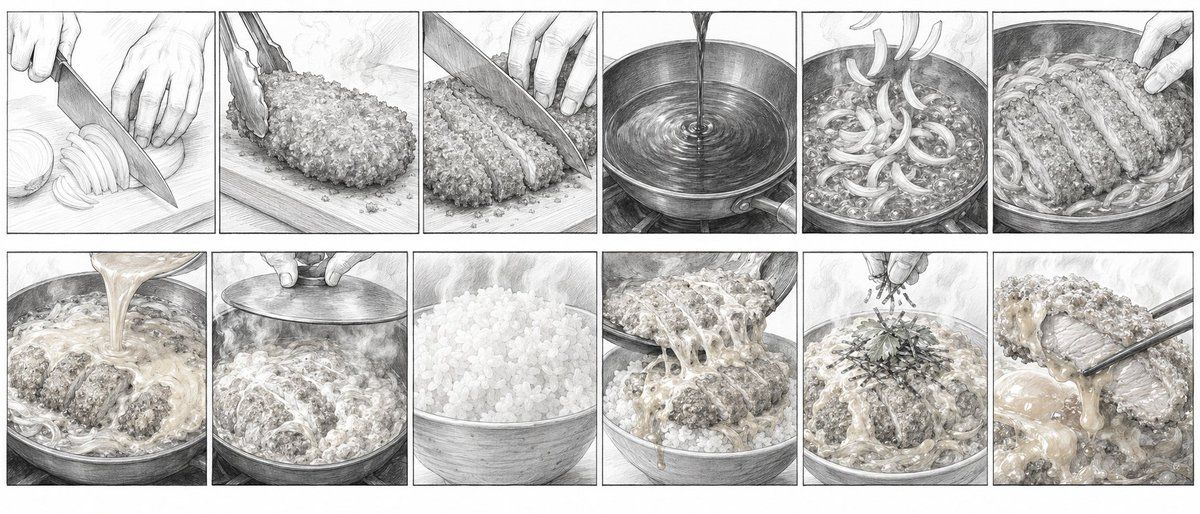
Goal: Create a monochrome cooking storyboard illustration showing the preparation and serving of a Japanese-style katsudon rice bowl, drawn like a detailed manga storyboard or recipe process sheet. Canvas: Wide horizontal aspect ratio, about 2.4:1, white background, arranged as exactly 12 rectangular panels in a clean grid: 6 panels across the top row and 6 panels across the bottom row. Thin black borders separate every panel. No captions, no speech bubbles, no logos, no watermark. Visual style: Highly detailed pencil sketch and light watercolor-wash look, mostly grayscale with subtle warm beige tones in the egg sauce and fried cutlet. Fine crosshatching, visible paper texture, realistic hand-drawn food textures, steam, highlights on oil and sauce, cinematic close-up framing in every panel. Subject: A step-by-step cooking sequence for {argument name="dish name" default="katsudon"}, featuring sliced onion, breaded pork cutlet, simmering egg sauce, rice, and garnish. Use realistic adult hands when hands appear, cropped close to the food. Panel layout and exact panel count: Show exactly 12 panels, ordered left to right, top row then bottom row: 1. Close-up of hands slicing a pale onion into thin crescent slices on a cutting board with a large kitchen knife. 2. Close-up of a breaded pork cutlet on a cutting board, held with tongs, covered in coarse crispy crumbs. 3. Close-up of the fried cutlet being cut into thick strips with a knife, fingers holding it steady. 4. Top-down close-up of clear liquid or broth being poured into a round metal pan, creating circular ripples. 5. Close-up of sliced onions simmering in bubbling broth in the pan, steam rising. 6. Close-up of the sliced cutlet being placed on top of the onions in the pan by hand. 7. Close-up of beaten egg mixture being poured over the cutlet and onions, creamy ribbons spreading through the pan. 8. Close-up of a metal lid covering the pan while steam surrounds the edges. 9. Close-up of a large bowl filled with fluffy white rice, rice grains clearly defined. 10. Close-up of the cooked cutlet, onion, and soft egg mixture being slid from the pan onto the rice bowl, strands of egg stretching. 11. Close-up of the finished bowl being sprinkled with thin dark seaweed strips and green garnish on top, steam rising. 12. Close-up serving shot of chopsticks lifting one saucy slice of cutlet with soft egg dripping, the rice bowl visible underneath. Composition constraints: Keep each panel tightly framed and food-focused; maintain consistent lighting and hand-drawn pencil shading across all panels; make the sequence readable as a recipe storyboard; do not add text labels, numbers, extra panels, utensils not described, or colorful modern graphics.

Infographic / Edu Visualawesome-gpt-image-2GPT Image 2Infographic / Edu VisualUse template
Infographic / Edu Visual - Life Stages Composite Portrait

Infographic / Edu Visual - Life Stages Composite Portrait

Generates a cinematic photorealistic portrait showing one person from newborn to older adult in a single labeled timeline image.

Template

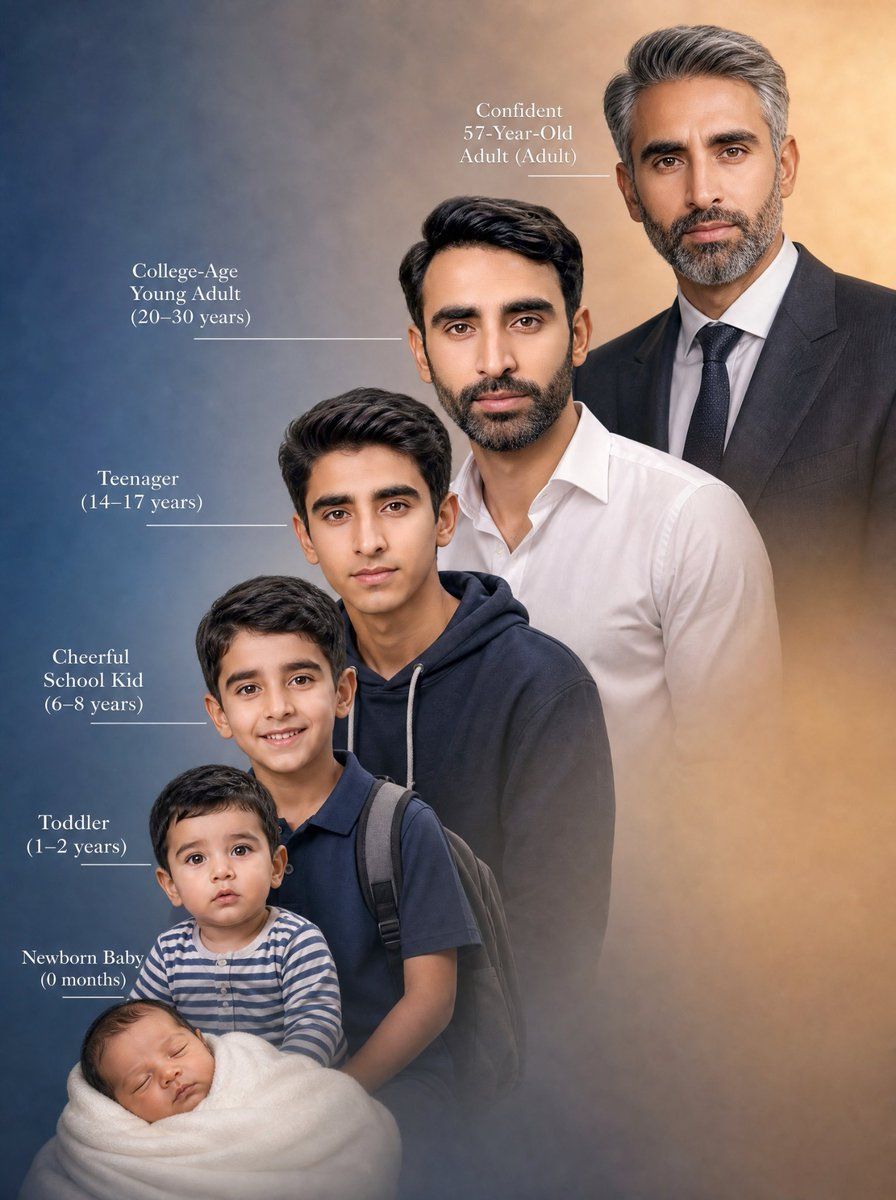
Create a vertical cinematic composite portrait showing the same male person across exactly 6 life stages in one seamless family-lineage style image, arranged diagonally from lower left to upper right as if time is progressing upward. Use {argument name="person description" default="a South Asian male with dark hair, medium skin tone, and similar facial features at every age"}. Canvas: 3:4 portrait orientation, photorealistic, studio-quality, soft painterly background gradient from deep blue on the left to warm amber beige on the right, subtle mist/vignette around the lower edges. Composition: six full or half-body age versions overlap in depth, with the youngest in front at the bottom left and the oldest behind at the top right; each older version is larger and positioned slightly higher/right. The six visible stages must be: 1) Newborn Baby (0 months), swaddled in a thick white blanket at the bottom left, tiny head visible; 2) Toddler (1–2 years), sitting just above the baby, wearing a blue-and-white striped long-sleeve shirt; 3) Cheerful School Kid (6–8 years), standing behind the toddler, wearing a navy polo shirt and a dark backpack with visible shoulder straps; 4) Teenager (14–17 years), standing behind him, wearing a dark navy hoodie with light drawstrings; 5) College-Age Young Adult (20–30 years), standing behind and higher, wearing a crisp white button-up shirt with open collar; 6) Confident 57-Year-Old Adult (Adult), tallest in the back upper right, salt-and-pepper hair, wearing a dark suit jacket, white dress shirt, and dark tie. Add elegant white serif labels on the left side with thin horizontal leader lines pointing to each corresponding figure, except the oldest label placed near the upper center-left with a short line toward the suited adult. Text must read exactly: "Newborn Baby\n(0 months)", "Toddler\n(1–2 years)", "Cheerful\nSchool Kid\n(6–8 years)", "Teenager\n(14–17 years)", "College-Age\nYoung Adult\n(20–30 years)", and "Confident\n57-Year-Old\nAdult (Adult)". Use {argument name="overall mood" default="emotional, nostalgic, inspiring"}, natural studio lighting, realistic skin and hair texture, cohesive facial resemblance across all ages, shallow depth-of-field, no logos, no watermark, no extra people, no extra text.

Infographic / Edu Visualawesome-gpt-image-2GPT Image 2Infographic / Edu VisualUse template
Infographic / Edu Visual - Six-Stage Life Progression Portrait

Infographic / Edu Visual - Six-Stage Life Progression Portrait

Creates a vertical photorealistic timeline composite showing one male subject from newborn to mature adult with Chinese age-stage labels.

Template

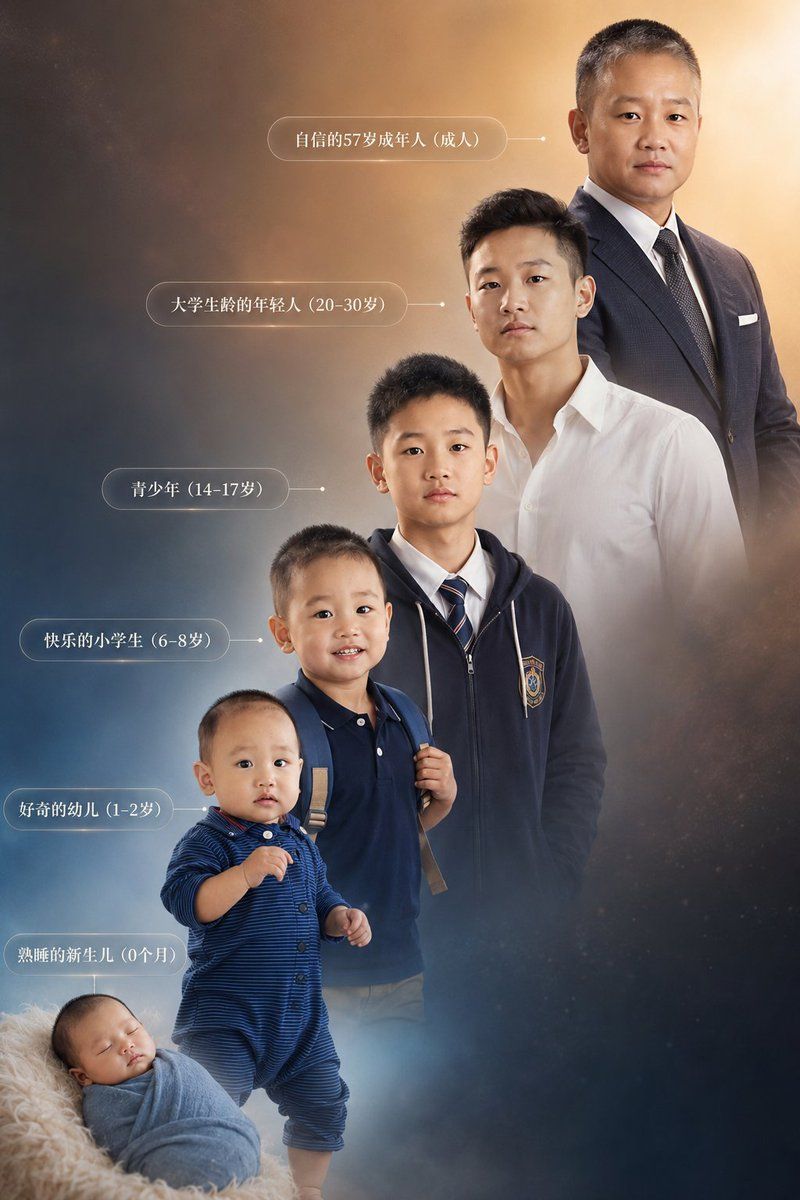
Goal: Create a highly detailed vertical composite photo showing the life progression of {argument name="subject description" default="the same Chinese male"} from birth to adulthood, with six separate age-stage figures arranged in a rising diagonal timeline. Maintain strong facial-structure continuity across all six versions of the same person, while making age, body size, clothing, posture, and hairstyle appropriate for each stage. Canvas: Vertical 2:3 portrait composition, cinematic studio-photography quality, warm golden light in the upper right fading into cool blue-gray mist in the lower left, subtle starry dust and smoky atmospheric background, soft depth of field, elegant inspirational tone. Layout: Arrange exactly 6 figures from bottom-left to top-right, increasing in age and height. The youngest baby is at the bottom-left foreground, the toddler stands above and slightly right, the elementary-school child stands behind, the teenager stands higher in the center, the young adult is upper-right center, and the mature adult is tallest at the top-right. Use overlapping bodies and scale changes to create a continuous life staircase. Subjects: Exactly 6 visible versions of the same male: 1. Newborn, 0 months: sleeping infant wrapped in a pale blue swaddle, lying on a fluffy cream blanket at the bottom-left. 2. Curious toddler, 1–2 years: standing child in a dark blue striped one-piece outfit, small hands raised slightly, short black hair. 3. Happy elementary-school student, 6–8 years: child wearing a navy polo shirt and backpack straps, standing confidently. 4. Teenager, 14–17 years: school-age boy wearing a navy zip-up hoodie with a school crest, white shirt, striped tie, neat short hair. 5. College-life young adult, 20–30 years: young man wearing a crisp white open-collar shirt, modern short black hair, relaxed posture. 6. Confident mature adult, 57 years: tall mature man in a dark business suit, white shirt, tie, pocket square, standing upright and dignified. Text content: Add exactly 6 translucent rounded-rectangle Chinese labels on the left side, each connected to the matching figure by a thin horizontal line and small dot. Use white serif-style Chinese text. The labels must read, from top to bottom: 「自信的57岁成年人(成人)」, 「大学生络的年轻人(20-30岁)」, 「青少年(14-17岁)」, 「快乐的小学生(6-8岁)」, 「好奇的幼儿(1-2岁)」, 「熟睡的新生儿(0个月)」. Visual style: Photorealistic composite portrait, high-end commercial retouching, soft rim light, realistic clothing texture, natural skin tones, coherent lighting across all age stages, gentle mist around the lower figures, warm halo around the adult at the top-right. Constraints: Keep exactly six figures and exactly six matching labels. Do not add extra people, panels, borders, logos, watermarks, or unrelated objects. The faces should be visible and consistent unless intentionally anonymized with {argument name="face treatment" default="plain skin-tone rectangular blur masks over each face"}.

Infographic / Edu Visualawesome-gpt-image-2GPT Image 2Infographic / Edu VisualUse template